
7 Best AI Tools That Auto-Apply to Jobs in 2026
You know the drill: endless forms, re-typing your work history, and watching posts disappear under a flood of résumés. Recruiters now sort through three-and-a-half times more applications than before the pandemic, so roles often close before breakfast.
The squeeze sparked a new class of helpers—AI bots that hunt openings, fill every field, and press Submit while you sleep. One developer blasted 5,000 applications and earned twenty interviews (about 0.5 percent), showing that speed saves time, but quality still earns callbacks.
This guide highlights seven bots worth your screen time in 2026 and explains how to turn their time savings into real interviews.
How AI Is Rewiring the Job Hunt – and Where It Trips Up
First, the good news. AI tools pick up the grunt work we all dread. They scrape fresh listings, paste your details into each form, and even draft a cover letter while you pour another coffee. Tasks that once ate an evening now finish before your toast pops.
Raw speed never guarantees traction. Companies counter with their own automation; applicant tracking systems filter out résumés that miss keywords or look copy-pasted, so a bot pushing identical content everywhere just shouts the same line at every booth.
The fix: use AI for reach, then tweak each submission so it sounds like you. That turns the bot from spam cannon into genuine time-saver.
How We Picked the Seven Stand-Out Tools
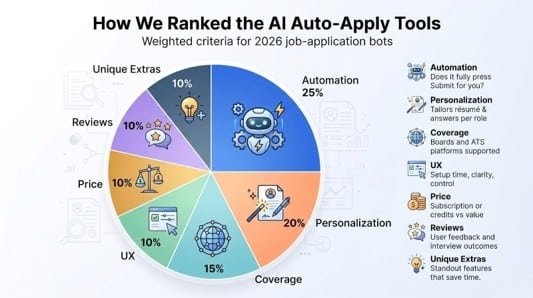
Choosing the best in a market full of Chrome extensions and AI claims takes more than skimming marketing pages. We dug into more than twenty contenders and stress-tested the shortlist against criteria you can verify yourself.
True automation: does it press Submit, or just paste your name? Full autopilot earned top marks.
Personalization power: a résumé shaped by GPT-4 for each post beats a one-size-fits-all PDF. We tested each tool’s tailoring against real job descriptions.
Coverage: a bot that ignores Workday or overseas boards leaves money on the table. We checked LinkedIn Easy Apply and tricky corporate ATS pages.
We weighed those strengths against user experience: setup time, transparency, and dashboard clarity, plus value for money. Any weekly billing trap that quietly drains your card dropped in the rankings.
Finally, we cross-checked hype with public sentiment. Trustpilot scores, Reddit stories, and real interview counts revealed which promises held up.
Assigning weights—automation (25%), personalization (20), coverage (15), UX (10), price (10), reviews (10), and unique extras (10)—produced a numeric ranking. The seven below outperformed every other candidate on the metrics that matter.
1 – AIApply: The All-In-One Autopilot That Still Sounds Human
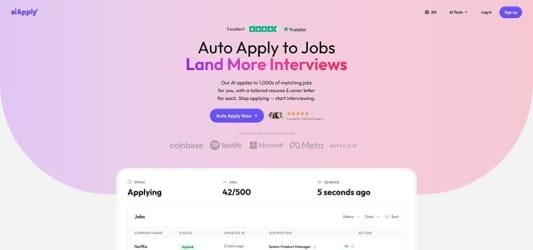
Picture AIApply: often called the best AI job automation tool, it scouts fresh roles, rewrites your résumé for each post, answers screener questions, and tracks the whole pipeline. That summary captures AIApply, and it tops our list because it delivers on the promise.
Setup feels familiar: upload your base résumé, paste a cover-letter outline, and tick a few preference boxes. Behind the curtain, AIApply’s GPT-4 engine digests each new job description, swaps keywords, reshuffles bullet points, and tweaks your opener so it mirrors the language recruiters look for. The result reads like you spent ten focused minutes tailoring, without spending those ten minutes.
Coverage is broad. LinkedIn Easy Apply, Indeed, ZipRecruiter, and major ATS portals on company sites are all within reach of AIApply’s Chrome helper. Instead of sending applications in one noisy surge, the bot spaces submissions throughout the day to mimic human rhythm and avoid spam filters.
The dashboard seals the deal. You see a Kanban board of every role: Applied, Under Review, Interview, Offer. One glance shows where to nudge a hiring manager or prep responses. Older mass-apply tools often leave you guessing where your résumé landed.
Cost sits in the middle: roughly the price of two streaming services each month. Pay annually and it drops by half. In return, you reclaim hours each week and give every application a fair shot at the keyword match.
Best practice with AIApply is simple. Let it run batch mode on the long tail of “nice-to-have” roles while you manually refine dream jobs. You gain volume without the copy-paste cringe, and you keep enough personal touch to stand out when a recruiter finally opens the file.
2 – Sonara: Your Tireless Scout for Highly Matched Roles
If AIApply is a Swiss Army knife, Sonara is a dedicated bloodhound. The service runs quietly in the background, finding openings that fit your profile and submitting your application before the post gets crowded.
You notice its focus during onboarding. Instead of pushing every listing your way, Sonara asks about salary ceilings, commute limits, and work-authorization rules. Those guardrails matter: users who answer honestly report fewer misfires and a cleaner interview pipeline.
Once running, Sonara scans boards around the clock. New lead lands at 2 a.m.? The bot sends your application while you sleep, spaces submissions to mimic human timing, and records each move in a minimalist dashboard. You wake to an email digest showing what went out and why, no detective work required.
The trade-off for this precision is volume. Sonara seldom floods employers. Expect forty to sixty focused applications a week, not hundreds. That restraint is intentional. Recruiters see a thoughtful résumé and a short, role-aware cover note instead of template spam, so your name lands closer to the top of the review stack.
Pricing sits on the higher shelf, about the cost of a nice dinner each month, but even one curated match can repay the fee. For professionals in specialized lanes such as health-tech product, AI governance, or senior FP&A, quality beats quantity.
Tip from power users: spend ten minutes in week one pruning broad keywords from your profile. Remove “marketing” if you truly mean “product marketing.” Narrow your location radius. That small tune-up sharpens Sonara’s aim and keeps your inbox clear of roles you would skip.
Bottom line: Sonara shines when you already know the bullseye and want an autonomous partner to hit it again and again without collateral spray.
3 – JobCopilot: Volume-First Coverage for the Relentless Applicant
Some searches demand raw reach. Maybe you’re pivoting careers, maybe you need a new role yesterday. JobCopilot exists for those high-urgency moments.
Think of it as a roaming bot network. Each morning the platform scrapes dozens of boards, from LinkedIn and Indeed to niche company sites and stubborn Workday portals, then queues everything that matches your filters. After that, it sends a steady drip of applications through the day, often topping one hundred submissions by sunset.
That firepower shows up in the numbers. Users often report fifty to a hundred outbound apps per week without lifting a finger. More impressive, JobCopilot tweaks your résumé wording to match each description and drafts a concise cover paragraph, so you’re not blasting pure copy-paste.
Still, power brings responsibility. The system’s aggressive résumé booster sometimes invents skills to fit a posting. One user spotted a phantom “Top Secret clearance” that never appeared on the original résumé. The fix is painless: review the “Pending” tab before the bot finalizes edits; skipping that step can invite awkward recruiter questions later.
Billing also needs your attention. JobCopilot markets a weekly fee that sounds light, yet four weeks pass quickly. Set a calendar reminder so the subscription doesn’t outlast its usefulness.
Use JobCopilot when scale beats surgical precision. Let it blanket mainstream boards, then spend the freed-up hours on networking, portfolio polish, or mock interviews. You’ll cover ground no solo job seeker can match while still steering the quality controls that keep your professional brand intact.
4 – LoopCV: A Global Job Radar That Fires for You
LoopCV tackles a different headache: finding openings beyond the usual suspects. While most bots circle LinkedIn and Indeed, LoopCV searches European boards, niche tech hubs, and email-only listings that larger tools overlook.
You begin by setting a tight brief: role titles, salary floor, cities, or “remote only.” Each night LoopCV scans its network, bundles matches into an email, and (on the paid tier) auto-applies with your stored résumé and template note. Wake up and the grunt work is done.
Expect moderated volume, roughly twenty to forty applications a week, because the engine obeys your filters. If nothing fits, it waits instead of firing junk. That restraint keeps your inbox clean and your brand consistent.
Personalization stays light. LoopCV swaps a few keywords but will not rewrite paragraphs. The trade-off is speed and a low price, about the cost of a café lunch per month. For multilingual or cross-border seekers, that is a bargain, especially when Simplify-style autofill tools stall on non-US sites.
Two pro tips:
- Upload a couple of résumé variants and tag them to matching keywords. LoopCV will pick the right file automatically, raising relevance without manual edits.
- Revisit your filters after a week. Many users discover they were either too narrow (zero matches) or too broad (off-track roles). A five-minute tweak realigns the feed.
LoopCV shines when you are open to relocating or targeting companies outside Silicon Valley’s shadow. It keeps the search lights on across time zones, so you never miss a posting that disappears while you sleep.
5 – Simplify: The Free Autofill Sidekick Every Applicant Should Install
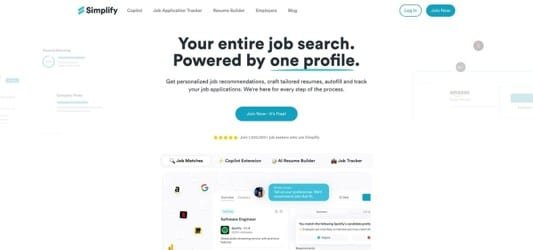
Not every task needs advanced AI. Sometimes you just want the form to stop asking for your college zip code. Simplify hits that practical sweet spot.
Add the Chrome extension, fill out your profile once, and watch it auto-populate name, dates, and repetitive checkboxes across more than a hundred ATS systems. Greenhouse, Lever, and Workday fields turn green, you click Next, and the page suddenly feels civilized.
Because Simplify never presses “Submit,” you stay in control. That balance wins praise on Reddit, where job seekers report cutting application time in half without losing accuracy. When a long-answer box appears, Simplify steps back so you can craft a thoughtful response.
The tool is completely free. The team hints at future enterprise revenue, yet individual users see no credit card screen, no usage cap, and no sneaky résumé ads.
Use Simplify as your baseline. Pair it with a heavier hitter like AIApply or LoopCV for automated submissions, then rely on Simplify for manual, high-stakes applications where you want to personalize every line but refuse to retype your phone number again.
One caution: free does not equal flawless. Government portals and a few legacy HR sites can still stump the extension. When that happens, complete the first form manually; Simplify often learns the pattern and speeds up the next similar page.
For zero dollars and five minutes of setup, Simplify earns a permanent spot in your browser and removes the single ugliest chore in online job hunting.
6 – LazyApply: The Original Volume Blaster With Rough Edges
LazyApply popularized the idea of “wake up to hundreds of applications sent overnight.” Install the extension, feed it a résumé, flip the switch, and the bot hammers LinkedIn and Indeed until quotas run dry.
That brute force still works for reach. One early user sent five thousand applications and received roughly twenty interviews, a half-percent hit rate that is hard to match manually. If you need any conversation at all, volume can offset modest odds.
The downsides surface quickly.
LazyApply reuses the same résumé and optional cover note everywhere. Recruiters spot duplicates, and applicant tracking systems ignore generic keywords. Reddit testers reported five hundred applications with a single callback, largely because the bot even double-applied to the same role across multiple boards.
Pricing also polarizes seekers. There is no monthly dip-a-toe plan; only an annual fee up front. That is fine if you apply daily for weeks, but tough to justify for a light search.
Where does that leave us?
LazyApply remains useful for candidates who value quantity over craft: high-volume entry-level hunters, recent grads chasing any foot in the door, or workers hit by sudden layoffs who must shotgun every opening fast. Pair it with a free tool like Simplify to tidy manual applications, and review sent lists often so you are not surprised when three identical interview invites arrive.
In short, LazyApply is a sledgehammer. Wield it when speed matters more than subtlety, and accept the dents that come with that power.
7 – ApplyGenie: A Pay-Per-Batch Turbo Button for Multi-Platform Applications
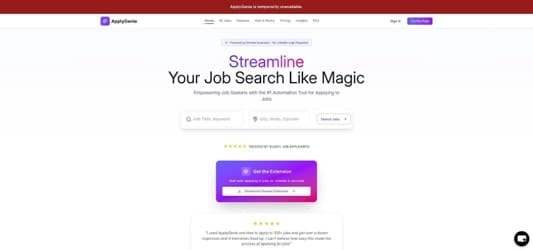
Applying across multiple job boards feels helpful and frustrating at once. It promises reach, yet still asks for mini essays and phone numbers again and again. ApplyGenie fixes that loop across several major platforms.
Instead of a subscription, you buy credits: one credit equals one application. Ten free credits let you test drive; one hundred cost about the price of a night out. Load the Chrome extension, queue your target roles, and hit Start. ApplyGenie fills every field, drafts short answers with AI, waits a human-like pause, then submits.
The multi-platform focus is a strength. Because the extension aggregates jobs from more than ten boards, including LinkedIn and Indeed, it handles the quirks of each form better than tools that treat external sites as an afterthought. One Reddit reviewer earned two interviews from a hundred automated submissions, a solid two-percent yield for zero manual typing.
Limitations are clear. While ApplyGenie covers major boards, its connections can sometimes be buggy, and users have noted brief issues with its Indeed link. If your dream employer hides roles on a customized portal, you will still apply the old-fashioned way.
Where it shines is burst work. Fire off a hundred targeted applications during lunch, then return to polishing a portfolio. You pay only for the push you need, avoid recurring fees, and keep the rest of your workflow untouched.
For hunters whose leads live mainly on big job boards and who hate repetitive fields, ApplyGenie ranks among the fastest, simplest fixes available in 2026.
How the Seven Stack Up at a Glance
We just toured each tool in detail, so let’s zoom out and view the forest.
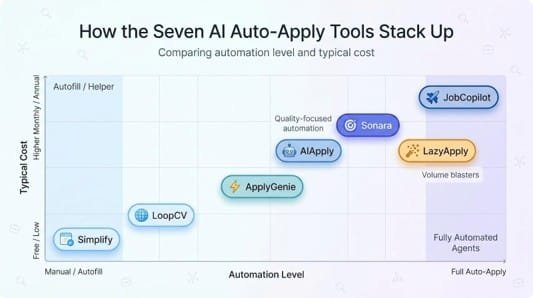
Imagine a spectrum. At one end sits Simplify, the free autofill add-on that trims minutes from every form while leaving strategy in your hands. At the other end is JobCopilot, a tireless agent that scours every corner of the internet and fires a triple-digit application count each week. The remaining five line up between those poles, trading raw volume for sharper targeting or richer personalization.
Cost follows automation. The more a service leans toward “done for you,” the higher the price tag. That is why Sonara and JobCopilot hover near fifty dollars a month, while LoopCV and ApplyGenie feel almost casual on your wallet.
Success rates mirror focus. Tools that limit themselves to well-matched roles—Sonara and AIApply—yield fewer total interviews, yet those conversations usually come from openings you would gladly accept. LazyApply’s shotgun approach lands more callbacks in absolute terms, though many will be roles you skip after reading the fine print.
Control also varies. If you need oversight, AIApply’s Kanban tracker and ApplyGenie’s credit model let you approve content before anything fires. Prefer zero maintenance? Turn Sonara on once and answer emails when they arrive.
Use this map to spot your gap. Pair one automated solution with Simplify for the inevitable manual outliers, and you will cover every base without giving up every evening to drop-down menus.
Pro Tips to Turn Automation Into Offers
AI tools save hours, but those hours only count if they turn into interviews. Here is how to squeeze the most value from every bot in the lineup.
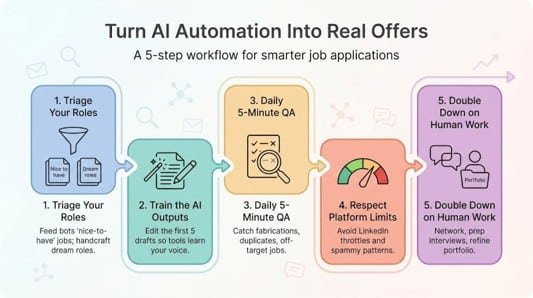
Start by triaging your roles. Feed the AI your “nice to have” jobs, the ones you would consider but would not miss. Reserve dream companies for a handcrafted pitch. This split keeps volume high without sending a generic note to the hiring manager you admire.
Next, edit the first five outputs. Whether it is AIApply’s cover letter or Sonara’s answer to “Why us?”, open a handful, tweak the tone, and hit save. The system learns your style, and every future draft lands closer to your voice.
Set a daily review ritual. Five minutes in the dashboard catches résumé fabrications, duplicate submissions, or jobs outside your range before they irritate recruiters. Think of it as quality control for your personal brand.
Respect platform limits. LinkedIn throttles accounts that fire too many Easy Apply requests too fast. Cap automated runs under thirty per day and split them between morning and afternoon. The bot handles timing, and you avoid shadow bans.
Finally, use the time you saved on admin to network like it is a job. Send a thoughtful follow-up to alumni at target firms, prepare for likely interview questions, and refine portfolio pieces. Automation handles the grunt work; you double down on the human work only you can do.
FAQs: Straight Answers on AI Job-Application Tools
Do these bots improve your odds?
Yes, if you measure by interviews per hour invested. Automation boosts volume so you land on more shortlists with less effort. The final conversion still depends on fit and interview skill, not the bot.
Will companies know I used AI?
They notice only when the output sounds robotic or form fields contain bad data. Edit drafts, cap daily submissions, and you blend in with manual applicants.
Is it safe to hand over my résumé?
Established tools encrypt data in transit and at rest, but you are still trusting a third-party server. If privacy tops your list, stick to Simplify’s local autofill or an on-device option such as RONIN.
Which option is best for tight budgets?
Pair Simplify (free) with a month of LoopCV or a 100-credit pack from ApplyGenie. You will cover global boards and LinkedIn for under twenty dollars.
Can I run two tools at once?
Yes. Many seekers let Sonara handle curated matches while LazyApply or JobCopilot covers the long tail. Just avoid duplicate submissions to the same listing; track apps in a simple spreadsheet or in AIApply’s dashboard.
Conclusion
AI-powered application tools can reclaim hours and widen your reach, but they work best when paired with thoughtful oversight. Choose the service that matches your needs, edit its first drafts, and monitor daily activity. Let automation handle the drudgery while you focus on networking and interview prep—the places where humans still win jobs.